Command reference
Two CLIs ship with chasm. chasm is the operator’s daily interface;
chasmctl exposes the supervisor’s full surface, mostly as JSON, for
scripting. chasm help COMMAND and chasmctl help COMMAND print each
CLI’s per-command help; neither needs a readable site descriptor, so
help still works on a host whose descriptor is missing or invalid.
chasm
chasm
chasm COMMAND [OPTIONS]
chasm help [COMMAND]
Running chasm with no arguments lists sandboxes. Every command accepts
-h/--help. A -- marker ends option and help-flag scanning: everything
after it is taken as literal data, so chasm describe NAME --set -- --text
stores the text --text.
| Command | Form |
|---|---|
create |
chasm create NAME [BUDGET_MEMORY_MIB] [--memory MIB] [--cpu N] |
show |
chasm show [NAME] [--layout] [--json] |
resize |
chasm resize NAME [--memory SIZE] [--cpu N] [--root-disk SIZE] |
describe |
chasm describe NAME [--set TEXT \| --clear] |
repos |
chasm repos [REPOSITORY] |
start |
chasm start [NAME] |
pause |
chasm pause NAME |
resume |
chasm resume NAME |
stop |
chasm stop [NAME] |
delete |
chasm delete NAME |
shell |
chasm shell [NAME] |
doctor |
chasm doctor [--json] |
exec |
chasm exec NAME [--cwd DIR] [--env KEY=VALUE ...] [--status-fd FD] -- COMMAND [ARG ...] |
create NAME [BUDGET_MEMORY_MIB] [--memory MIB] [--cpu N]
Create a named sandbox from the sealed template. NAME is 1–32
lowercase letters, digits, or hyphens (leading/trailing hyphens
rejected). The optional budget is in MiB with a 512 MiB floor (default
3072; --memory MIB is the same setting), and --cpu N sets the CPU
budget (default 2). Memory budgets reserve host headroom: a later
start is refused when the running budgets plus this one would exceed
the host’s cap (host memory minus host_reserve_mib), counting each
sandbox at the larger of its recorded and enforced value. CPU is capped
per sandbox at create and resize only — a budget above the host CPU
count is refused there; start admission does not sum CPU. A memory
budget above its host cap is refused at create time, naming the cap’s
source. The new sandbox gets its
own persistent /workspace volume plus the global /shared volume and
is left stopped.
Sandbox storage
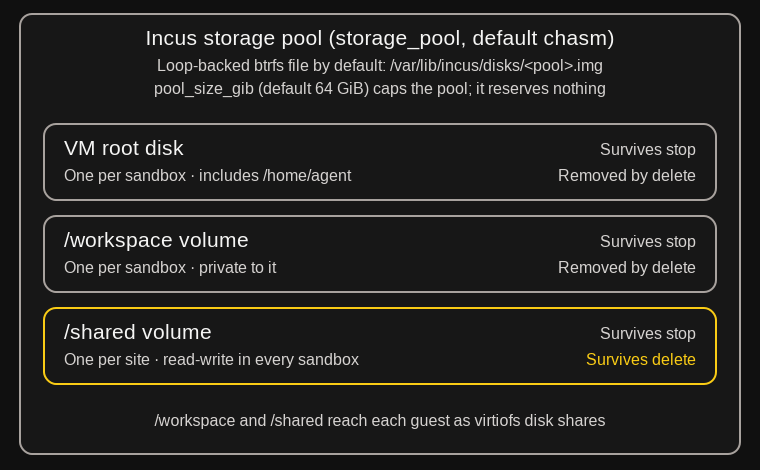
| Location | Who mounts it | What happens on delete |
|---|---|---|
VM root disk, including /home/agent |
Only this sandbox | Removed with the VM |
/workspace |
Only this sandbox | Removed with the sandbox |
/shared |
Every sandbox on the site, read-write | Retained when an individual sandbox is deleted |
All three persist across chasm stop and chasm start. Use /workspace
for project files that should stay private to one sandbox. Use the root
disk for files that belong to the VM, such as tools and account settings.
Use /shared for deliberate collaboration. File permissions still apply
inside each mount.
The root disk and /workspace are separate storage objects on the site’s
Incus pool. Host administrators can access both. A workload can still
copy its own files to /shared or send them over the network.
show [NAME] [--layout] [--json]
chasm show NAME displays that sandbox’s details and resources. With no NAME,
chasm show displays the site’s default_sandbox status, the site services,
and host/pool information; without a default_sandbox, NAME is required.
--layout requires NAME and shows a filesystem observation bounded to three
levels. Running
sandboxes are observed live; paused or stopped ones return the last saved
observation or report that they have not yet been observed.
The detail view includes the latest recorded create, start, and stop
attempts for that sandbox. Timings are elapsed milliseconds. They cover
observed phases such as cloning, boot, guest-agent readiness, shutdown,
and stopped-state confirmation. Older sandboxes can have no timing history.
Use --json to read the same observations under lifecycle_observations.
Each entry includes the operation, timestamp, request ID, outcome, and
phase_timings_ms. Lifecycle audit entries carry the same phase durations.
After the detail fields, show prints a Resources section that reports
each resource from every angle that can disagree (idiom 2). Every value names
its source. When collection succeeds, a value chasm cannot observe is shown
as unknown with the reason, never guessed. If collection fails as a whole,
the Resources section prints Resources unavailable (REASON) instead of
individual values:
- declared — what chasm recorded in the sandbox’s budget keys;
- enforced — what Incus applies (
limits.memory,limits.cpu, the root devicesize); when the two differ,showprints a drift line naming the command that resolves it, for exampledrift: memory record 20480 MiB, enforced 49152 MiB; fix: chasm resize NAME --memory 49152; - guest — what the guest agent reports (
memory.total,memory.usage); a VM whose agent is not reporting shows these as unknown; - host cost — what the host actually spends: the instance process’s
VmRSSwhile the sandbox runs (a paused one still has a process, so its resident memory is reported too), the workspace volume’s usage, the root disk’spool holdsfigure (the storage pool’s usage of the root volume, as the storage driver reports it — not what the guest’sdfshows), and the storage pool’s own numbers.
The human view labels each value with the angle it comes from —
declared, enforced, guest, or host — and the root-disk row names
whether its size comes from the site profile or an instance override.
The JSON output (chasmctl without human mode) additionally carries
each value’s exact source string. The workspace row carries the pool’s size and used
space next to the volume’s, because a quota-less /workspace shares the
pool: the guest’s df on /workspace shows pool-wide numbers, and this
row is where those numbers come from. For a loop-backed pool, the pool
row also shows the loop file’s allocated bytes against its apparent size
and the free space of the filesystem that holds it.
Every show — named or default — ends with a host line: MemTotal,
MemAvailable, host_reserve_mib, the sum of the larger of recorded
and enforced memory of running sandboxes, and the host’s observed own
usage (total minus available minus the sandboxes’ resident memory). When that observed own
usage exceeds host_reserve_mib, chasm warns that the admitted budgets
may not fit and names the fix (raise host_reserve_mib in site.conf and
rerun provision).
describe NAME [--set TEXT | --clear]
Show, set, or clear a sandbox’s human-readable description. TEXT is
one trimmed printable line, at most 120 characters. Literal text that
starts with - is given after the end-of-options marker:
chasm describe NAME --set -- --text.
repos [REPOSITORY]
List every observed Git repository across sandboxes, or locate one by
basename. Discovery never starts a stopped sandbox; results say whether
each observation is live, last-observed, or unavailable. Extra worktrees
under /workspace/.worktrees stay visible in the sandbox layout but are
not listed as independent projects.
start [NAME]
Start a sandbox and wait for its guest agent. Named sandboxes may run together when their declared budgets fit host headroom.
pause NAME / resume NAME
Pause freezes the VM while preserving its running state; resume
continues the paused VM in place. Both take an explicit NAME (neither
addresses a default sandbox). Instance and volumes are untouched.
stop [NAME]
Stop a sandbox without deleting persistent state. It accepts a running or already-stopped sandbox; resume a paused sandbox first. Chasm asks the guest to shut down (60 seconds), falls back to a forced stop if that fails, and succeeds only after confirming the stopped state.
resize NAME [--memory SIZE] [--cpu N] [--root-disk SIZE]
Resize a stopped sandbox. At least one flag is required; SIZE
accepts plain MiB integers (2048, as create reads a memory budget)
and explicit suffixes (2GiB, 2048MiB). The command is refused while
the sandbox runs — stop it first with chasm stop NAME.
--memoryrewrites the declared budget and the enforcedlimits.memorytogether; a target above the host’s cap (host memory minushost_reserve_mib) is refused with the cap’s source named.--cpurewrites the CPU budget andlimits.cpu; the cap is the host CPU count.--root-diskgrows the root device only: a smaller size is refused with the current size named, re-applying the current size is a proven no-op, and the new size may not exceed the storage pool’s configured size.
The changes apply in a fixed order (memory, CPU, root disk) and every
change is proven by reading the applied value back. A failure after at least
one resource has been applied names the resources applied and those not applied.
Memory and CPU are each two writes (recorded budget, then enforced limit), so
a failure inside one of those steps can leave its budget changed while its
limit is not; check chasm show NAME before retrying. A memory
resize also repairs drift: when the recorded budget and the enforced
limit differ (for example after a change made outside chasm),
chasm resize NAME --memory X brings both to X. Re-applying the same
values is a no-op that still proves the current values.
delete NAME
Delete a stopped sandbox and its workspace volume (deletion is
refused while it runs). Each teardown step — instance, per-sandbox
/workspace volume, catalog entry — is proven before the delete
succeeds. The global /shared volume is never touched. Passing a
sandbox--prefixed instance name is refused. Idempotent: an
already-absent sandbox reports already_deleted.
shell [NAME]
Open an interactive login shell as the unprivileged agent user in
/home/agent, using the site’s guest uid/gid. Chasm does not grant
general Incus or root access. On a Linux desktop, application text
copies are bridged to the desktop clipboard with xclip (X11) or
wl-copy (Wayland) when installed — but only when the command runs
wrapped in the standalone chasm-clipboard helper (see
clipboard.md); unwrapped, chasm shell is a plain
terminal session. For remote hosts, run
chasm-clipboard -- ssh -t HOST chasm shell NAME on the desktop.
doctor [--json]
Run as the configured operator to check the installed host and site. Doctor validates the descriptor before using the installed read-only sudo helper. It inspects service state without activating the Chasm sockets and queries Incus only when its daemon is already running and the site identity matches. Guest readiness uses the VM’s existing state and process-count evidence.
The default output is human-readable. JSON reports version: 1 and a
checks array. Each check includes an id, status, summary, and
source, along with a remedy when applicable. Status values are
ok, warn, fail, and skipped. A failed check returns exit 1.
Warnings and skipped checks leave the exit status at 0 when no check fails.
Doctor returns usage exit 2 for invalid arguments.
exec NAME -- COMMAND [ARG ...]
Run a foreground command in a running sandbox as the site’s unprivileged
guest user. The mandatory -- ends Chasm options. Arguments after it are
passed directly to Incus, including empty arguments and shell metacharacters.
Use an explicit shell command when you need guest-side shell evaluation.
chasm exec research --cwd /workspace --env MODE=check -- /usr/bin/printenv MODE
printf 'input\n' | chasm exec research -- /usr/bin/cat
chasm exec research --status-fd 3 -- /usr/bin/false 3>exec-status.json
The default working directory is /home/agent. Set guest environment
variables with repeated --env KEY=VALUE options. Keys must be unique.
Stdin, stdout, and stderr are separate byte streams, with no terminal
allocation. Send Ctrl-C to request termination. Chasm sends TERM, gives
the command two seconds to finish, and attempts KILL if it is still running.
An abandoned client connection also triggers cleanup. Incus signals the
primary guest command. Detached descendants are outside that guarantee.
Chasm admits eight foreground execs per site. Requests can carry up to
256 argv entries and 64 environment variables, with a 16 KiB limit per
argument or value and a 64 KiB encoded request limit. The root-owned
exec-audit.jsonl file is capped at 64 MiB; once full, admission fails
closed until an administrator archives and clears it.
The optional status descriptor must be writable, inherited, and numbered
3 or higher. It receives one JSON line with version, disposition, and
available fields including request_id, code, guest_status, output_code,
signal_sent, and timings_ms. Dispositions are completed, rejected,
interrupted, and outcome_unknown. A signal_sent value records the last
signal written to the Incus control channel. It does not confirm which
signal caused exit. Incus can synthesize return code 129 on VM disconnect,
so a genuine guest exit 129 is confirmed separately: the command leaves a
marker in the guest, and Chasm checks for it after Incus returns. With the
marker, the result is completed with guest_status 129 and
confirmation: "status_marker". Without it, or if the check fails, Chasm
reports outcome_unknown and retains the code as incus_return (CLI 124).
exec and shell are refused until the sandbox finishes initializing.
An output_code of output_incomplete means output could not be fully
delivered. If the guest exited 0, the CLI exits 125 so truncated output is
never reported as process success; guest_status still records 0. Other
confirmed guest statuses pass through. Slow output consumers block delivery
without cancelling the guest; a closed output pipe triggers cleanup.
See Drive a sandbox from an agent for a complete
automation example.
Compatibility commands
list, status, inspect, layout, and locate are retained for
migration and map onto chasm, show, show, show --layout, and
repos respectively. Each one prints its own usage line when given bad
arguments. They work, but new scripts and documentation should use the
preferred forms. chasm help aliases lists them.
chasmctl
chasmctl [--supervisor-socket PATH] COMMAND ...
chasmctl is the operator-level CLI over the supervisor. Output is JSON by
default. SANDBOXING_OUTPUT=human (set automatically by chasm when it
delegates) renders text for listing, description, repository, status,
inspection, layout and resize results, and for all errors; other successful
results stay JSON.
Every command below talks to the supervisor over its Unix socket,
/run/chasm-supervisor.sock by default; pass --supervisor-socket PATH
to override it. As with chasm, chasmctl help and chasmctl help
COMMAND work without a readable site descriptor, so a host whose
descriptor is missing or invalid still gets working help.
Supervisor commands:
create-sandbox INSTANCE [BUDGET_MEMORY_MIB] [--cpu N]
describe-sandbox INSTANCE
set-sandbox-description INSTANCE DESCRIPTION
list-sandboxes
inspect-sandbox INSTANCE
start-sandbox INSTANCE
stop-sandbox INSTANCE
pause-sandbox INSTANCE
resume-sandbox INSTANCE
resize-sandbox INSTANCE [--memory SIZE] [--cpu N] [--root-disk SIZE]
                 (SIZE: MiB integer, or GiB/MiB suffix)
delete-sandbox INSTANCE
admit-launch INSTANCE
sandbox-layout INSTANCE DEPTH (1-5)
list-repositories
locate-repository REPOSITORY
sandbox-status
ensure-guest
stop-guest
collect-performance PHASE
Where a command takes INSTANCE, pass the Incus name sandbox-NAME;
chasm translates logical names to it automatically. chasmctl help
prints the full synopsis table.
Process exit status
Chasm control commands return 0 on success, 1 on configuration, authorization
or operation failure, and 2 for rejected usage. Help exits 0 when it
successfully writes the requested topic. A failure to write help or a
chasmctl operation result returns status 1. Most commands load the installed site configuration before
validating arguments, so a missing configuration can produce status 1 first.
The interactive shell delegates to the guest shell through sudo and Incus, and
its exit status reflects the delegated process.
chasm exec preserves a confirmed nonzero guest exit code and an exit 0 when
output was fully delivered. A completed guest exit 0 with incomplete output
returns reserved code 125; --status-fd still reports guest_status: 0.
Its own codes 124
(completion unknown), 125 (rejected), and 126 (local setup failure) can
coincide with guest exit codes. Use --status-fd for certainty. A usage
error returns 2 before status delivery. Treat an absent status frame as
unconfirmed and inspect the guest before retrying a command with side effects.
For automation, inspect the resulting sandbox state before retrying a failed state-changing request. An audit persistence error can follow a successful side effect.