Your first sandbox
This walkthrough assumes a provisioned site (see
install.md) and runs entirely as the operator user — no
root, no direct Incus access. chasm refuses to run as root: run it as
the operator account without sudo. The shell and exec commands
invoke their dedicated grants internally.
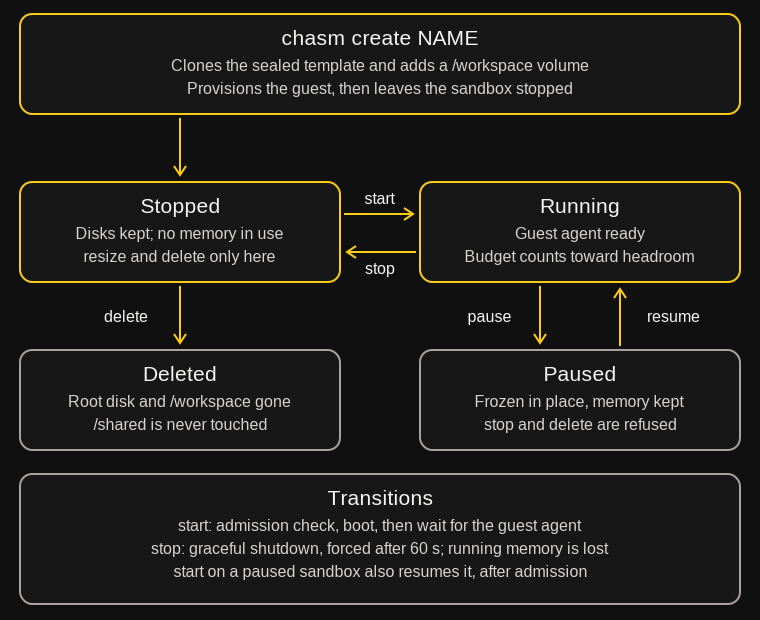
1. Create
chasm create research
The sandbox is created from the sealed template and left stopped.
It receives a persistent /workspace volume of its own and the global
/shared volume used by every sandbox on the site. Give it a memory budget if you want
one other than the 3072 MiB default:
chasm create research 2048
Budgets are declared in MiB with a 512 MiB floor (there is no fixed
product cap; the ceiling is this host’s memory minus the site’s
host_reserve_mib). The budget reserves host
headroom: chasm start refuses, naming the resource, when the sum of
running sandbox budgets plus the new budget would exceed that host cap.
A short description helps when several sandboxes exist:
chasm describe research --set "compiler experiments"
2. Start
chasm start research
Start boots the VM and waits for its guest agent. Multiple named sandboxes may run at the same time as long as their budgets fit host headroom.
3. Enter
chasm shell research
This opens an interactive login shell as the unprivileged agent user
(the site’s guest uid/gid) in /home/agent. The command uses a narrow
sudo grant to a root-owned entry helper; chasm never grants general
Incus or root access.
For a one-off command, use foreground exec from the host instead of
opening a terminal session. This command lists the sandbox’s /workspace
and writes the structured result to a separate file.
chasm exec research --cwd /workspace --status-fd 3 -- /usr/bin/ls -a 3>exec-status.json
Inside the sandbox:
/workspace— this sandbox’s persistent volume; explicit projects use/workspace/<projectname>./shared— the global volume shared by all sandboxes on the site.- SQLite WAL mode fails on these virtiofs mounts. On
/sharedwith Incus 6.0.4,journal_mode=DELETEworked, whilejournal_mode=WALfailed withdisk I/O erroron the first write. For/workspaceand/shared, use rollback journaling or keep the database on the guest root disk (for example under/home/agent); see troubleshooting.md. - The guest has the template’s tool baseline: zsh and CA certificates from
the core
minimalbootstrap profile (guest-config/profiles/minimal.profile). The optional developer tools (git, curl, jq, Python 3 with venv and pip, sqlite3, tmux, universal-ctags, vim) are thedeveloper-toolsplugin profile (plugins/developer-tools; see plugins.md) — to use them, installdeveloper-tools.profileinto/etc/chasm/profiles(root-owned, 0644), setbootstrap_profile=developer-toolsin/etc/chasm/site.conf, and reruninstall-chasm.sh --provisionto build that profile’s sealed template. Only sandboxes created afterwards get it.
Set a git identity (developer-tools profile only)
The core minimal baseline ships no git and no git identity: git is part
of the optional developer-tools profile (see section 3 above), so the
steps below apply only if you built your template with that profile
installed (or otherwise installed git yourself).
In every sandbox that does have git, no identity is baked in on purpose:
commits must carry your name and email, and baking one default identity
into every sandbox would misattribute work across every project the
sandbox ever touches. Set one per sandbox (or per repository under
/workspace) before committing:
git config --global user.name "Your Name"
git config --global user.email "you@example.com"
Until an identity is set, git commit refuses with Author identity
unknown — that is git protecting attribution, not a provisioning fault.
Paste with your terminal’s normal paste shortcut. Clipboard bridging is
not automatic: a plain chasm shell NAME session has no connection to
the desktop clipboard. Application copy actions are bridged to the
desktop clipboard only when you wrap the shell with the optional
chasm-clipboard helper (chasm-clipboard -- chasm shell NAME; see
clipboard.md and plugins.md).
4. Observe
chasm                  # list sandboxes
chasm show research    # status and details
chasm show research --layout   # observed filesystem, three levels deep
chasm repos            # Git repositories seen across sandboxes
Observation never starts a stopped sandbox: a running sandbox is read live; a paused or stopped one returns its last saved observation, or reports that it has not been observed yet.
5. Pause or stop
chasm pause research   # freeze the VM, preserving its running state
chasm resume research  # continue where it paused; also requests a best-effort guest clock resync
chasm stop research    # ask the guest to shut down; state is kept on disk
Paused VMs keep their memory; stopped sandboxes keep their volumes and restart fresh.
6. Delete
chasm stop research    # deletion is refused while running
chasm delete research
Deletion removes the instance, the sandbox’s /workspace volume, and
its catalog entry, proving each step before reporting success. The
global /shared volume is never touched. Deletion is idempotent:
deleting an already-absent sandbox succeeds.
Compatibility note
chasm list, chasm status NAME, chasm inspect NAME,
chasm layout NAME, and chasm locate NAME still work and map onto the
commands above; new scripts should use the preferred forms
(chasm help aliases lists them).
Continue with cli.md for the full command surface.